





WordPress and WooCommerce migration to another host







RDN Migrare
We move your site with its products, orders and customers.
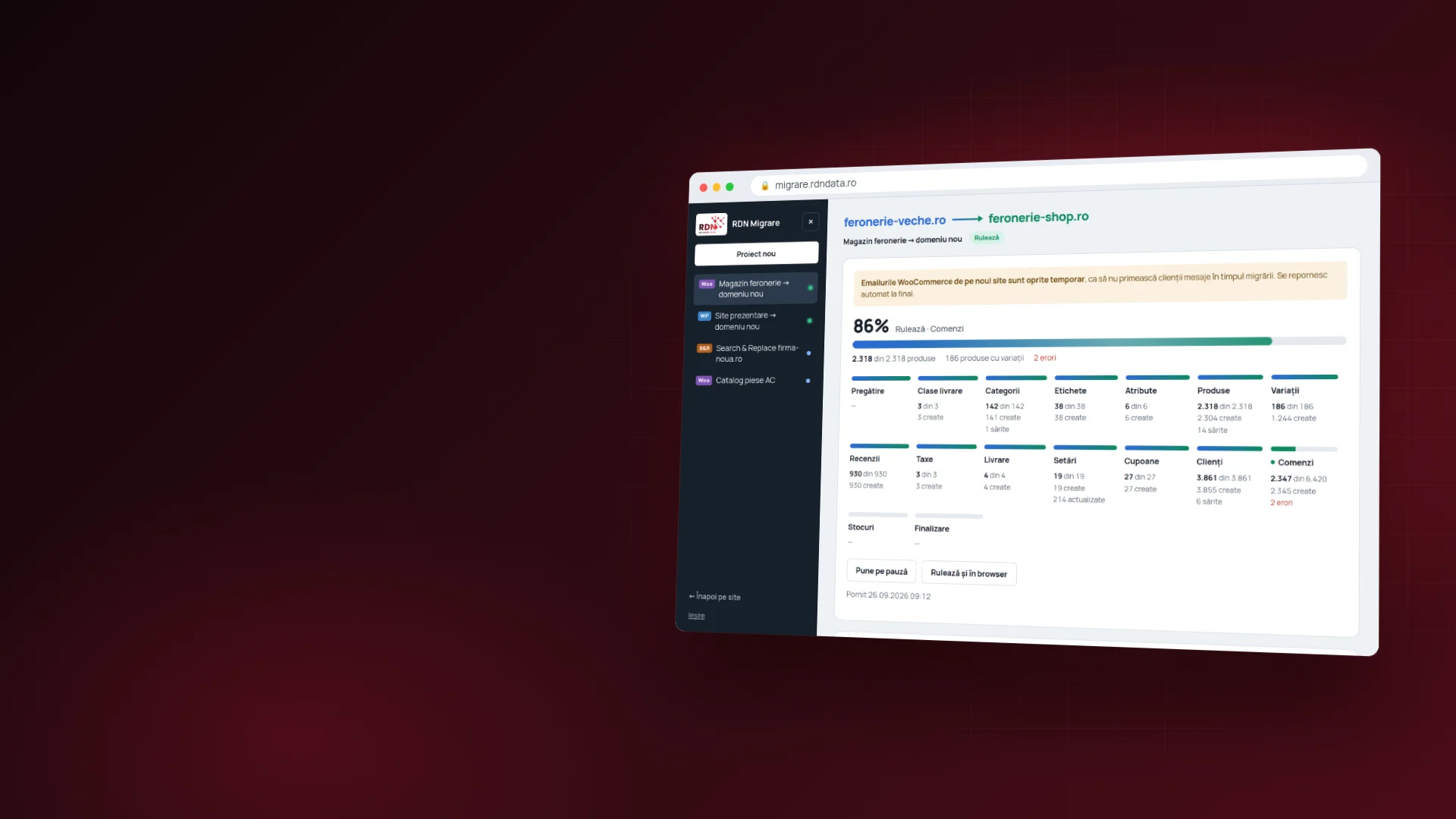
We move your WordPress site or store to another host or another domain, with all its products, orders and customers. Or you move it yourself, from your browser, with the same app we use.
What we move
Three services, each in two versions.
Each one comes in two versions: you give us access and we handle everything, or you buy a session and do the migration yourself, from your browser. The services in detail →

WooCommerce store
Between two stores that already exist, through their API keys. Nothing is installed on either one. Products with variations, categories, attributes, taxes and reviews move over, along with customers and their addresses, orders with notes and refunds, coupons and shipping methods.

Complete WordPress site
Files and the database move straight from the old server to the new one, with no archives made on the old one. The new domain goes in everywhere, including theme settings and Elementor. The old site stays online, and user passwords stay unchanged.

Search & Replace
Search and replace text in the database of any WordPress site, with no plugin. Useful for an old domain left in pages or for switching http to https. A dry run first, a backup of every row and a full undo from the history.
Pricing
What a migration costs.
Prices are in euros, for a single migration. No subscription and no costs that appear along the way. What each price includes →
We handle everything.
WooCommerce
online store
- up to 2,000 products
- up to 5,000 orders
- up to 5,000 customers
- emails paused during the move
- order numbers stay the same
WordPress
complete site
- up to 10 GB of files
- up to 1 GB database
- a single site
- the old site stays online
- user passwords stay
Search & Replace
in the database
- up to 10 “search → replace” pairs
- a single site
- dry run first
- backup of every row
- full undo from the history
Or do it yourself.
WooCommerce
online store
- one pair of stores
- no size limit
- access code for one migration
- the app guides you step by step
- phone help if you get stuck
WordPress
complete site
- one site
- no size limit
- access code for one migration
- the app guides you step by step
- phone help if you get stuck
Search & Replace
in the database
- one site
- no size limit
- access code for one run
- the app guides you step by step
- phone help if you get stuck
Above the limits in the table above, the price is set after a free analysis of the site, before any payment. The do-it-yourself session has no size limit.
“We handle everything” means checking both servers, the migration, checking the new site and the complete log, with everything left to do manually.
If you do it yourself.
A complete site, in five stages.

Security
Why you can trust us with your server.
For WooCommerce stores
What the app handles on its own.

Honest, from the start
What doesn't move automatically.
We'd rather you know from the start. They all appear in the final log too.
Frequently asked questions
What people ask us.
What people ask us most often before a move. All the questions →

How much does a migration cost?
If we handle it: €139 for a WooCommerce store, €79 for a complete WordPress site and €39 for a round of search and replace in the database. If you do it yourself, a session costs €69, €39 and €19 respectively.
Above the limits in the table we don't make up a higher price: we look at the site first, for free, and only then tell you what it costs. You pay nothing until you know the amount.
Will my site be down during the move?
No. The old site stays up the whole time and receives visitors as usual.
For a complete WordPress site, the new one is built in parallel and can be viewed and checked before you change the DNS. Only when you're happy with it do you switch the address, and visitors start arriving on the new server. You choose when to switch.
How long does it take?
It depends on how much you have: the number of products and orders, the size of the files and the speed of both servers. That's why we don't give you a made-up number here.
We tell you after checking both servers, which happens before any move and before any payment, with the “we do it” option. The check is free.
Do orders and customers move too?
Yes. Orders move with their notes and refunds, and customers with their billing and shipping addresses.
Every order keeps its old number, so issued invoices still match, and each order's total is compared with the one in the old store. Administrator accounts don't move.
What happens if the transfer is interrupted?
It picks up where it left off. Files move in 8 MB chunks, each one verified on arrival, and progress is saved after every step.
You can close the browser without worry. When you come back, the work done is still there — nothing starts over. The same goes if the Internet drops or a server responds slowly: the transfer waits and carries on by itself.
Do I have to install a plugin?
When moving a WooCommerce store, no: everything goes through the two stores' API keys, and nothing is installed on either one.
When moving a complete site, a single file is temporarily uploaded to each server, the “bridge”. It expires by itself after 72 hours, is deleted at the end, and the one on the old server can only read.
Can I move the site to another domain?
Yes. The new domain goes in everywhere the old one appeared, including theme settings and whatever you built with Elementor.
Data that WordPress stores in a special format — serialized or JSON — is rewritten correctly, not hacked apart by a crude “search and replace” that would break the page. Internal links and images move to the new domain too.
How does the access code work?
After you pay for the do-it-yourself plan on shop.rdndata.ro, you get an email with a code in the form RDN-XXXX-XXXX-XXXX. You enter it on the customer login page and see only your project.
The code is for a single migration, of the type you bought. It's valid for at most 7 days, counted from the first login — not from the purchase. Once the migration is finished, the code stops working.
What doesn't move automatically?
For a WooCommerce store, these stay behind: SEO settings from Yoast or Rank Math, recommended and grouped products, downloadable product files and customer passwords.
We leave you a complete log at the end, with everything that moved and what you still need to set up manually. We'd rather you know in advance than find out afterwards.
What do customers do about their passwords?
When a store is moved through the API, passwords can't be read — that's how WooCommerce is built, and that's a good thing. Customers set a new password with “Forgot password”, using the email they had.
When moving a complete WordPress site, passwords stay untouched: the whole database moves there. The rest of the account, addresses and orders, stays untouched too.
Let's talk
Tell us what you need to move.
Leave us your site's address and we'll tell you what can be done and what it costs. The check is free and you pay nothing until you know the amount.