
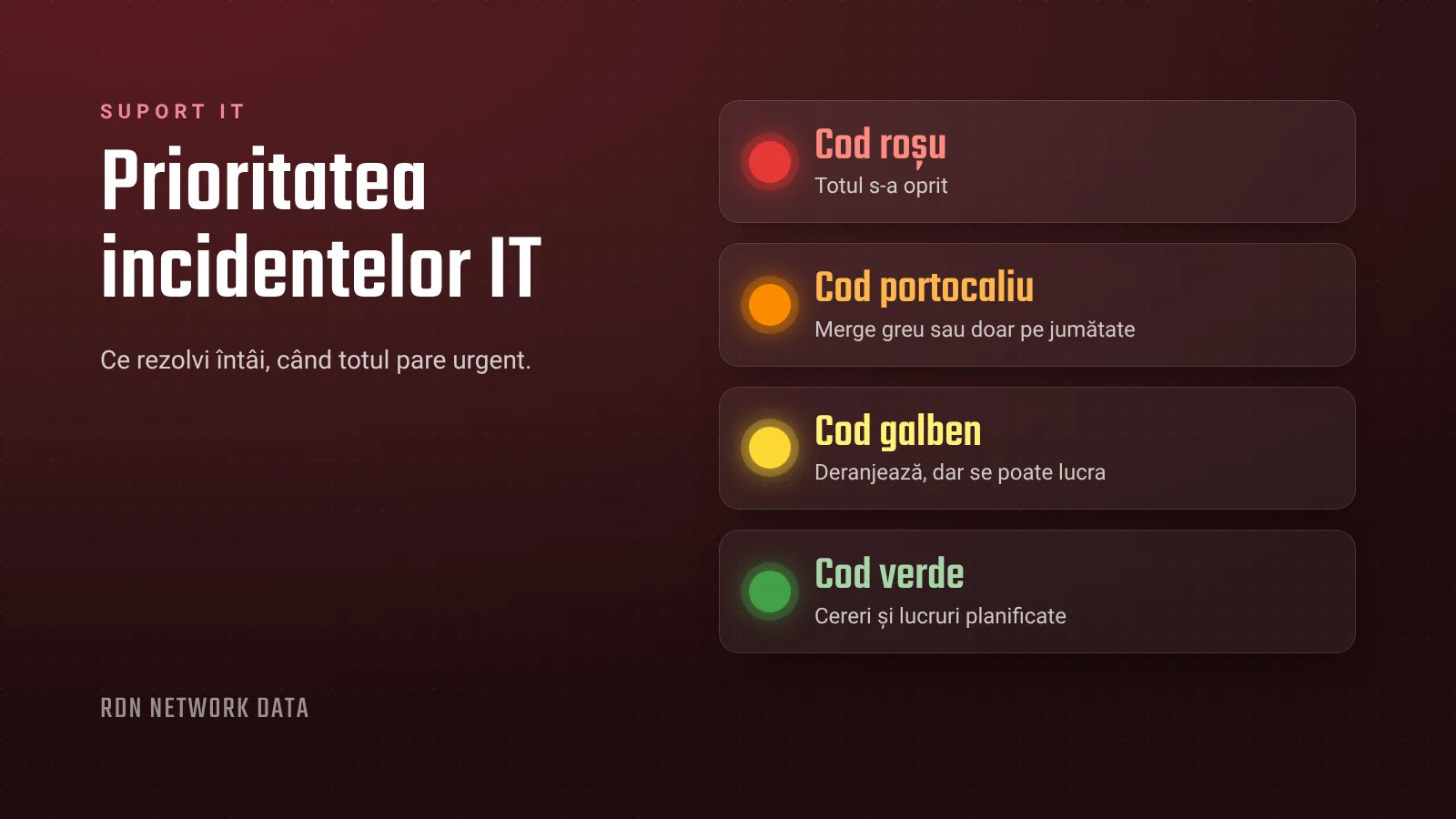
Code red, orange, yellow or green: IT incident priority.
· 4 min read
The server stops responding and, at the same time, someone can't print an invoice. What do you fix first? The answer comes down to IT incident priority. Most IT support teams split problems into four levels, and the easiest way to remember them is to give them colours, like weather warnings: code red, code orange, code yellow and code green. Below you will find what each code covers, how fast it should be handled and how to set the code of a problem yourself.
Code red: everything has stopped
The company can no longer work or is losing money right now. The problem affects everyone or hits a service your customers depend on.
- the main server doesn't respond or won't start;
- the website or online shop is down;
- nobody in the company has internet or email;
- the files have been encrypted by ransomware.
What you do: you call right away, you don't write an email. A critical IT incident is worked on without a break until the service runs again, even at night or at the weekend.
Code orange: it works, but badly or only partly
An important part of the business is affected, but the company is still working.
- a whole department can't use the invoicing software;
- emails go out or arrive with long delays;
- the nightly backup didn't run;
- the server disk is almost full.
What you do: you tell the support team as soon as possible. An orange problem is fixed the same day, otherwise it may turn red.
Code yellow: annoying, but work can go on
A single person or a single device has a problem and there is a workaround.
- one printer won't print, but the others work;
- a computer is slow;
- a program asks for an update;
- a user has forgotten their password.
What you do: you open a ticket with all the details. It is fixed over the next working days, in the order it came in.
Code green: requests and planned work
Nothing is broken: you need something new or a change you can schedule.
- an account and a computer for a new employee;
- installing a program;
- updates done outside working hours;
- moving an office or a piece of equipment.
What you do: you give notice in advance, with the date you need it by. It is planned together with the support team.
How to set the code of an IT problem
Two questions are enough: how many people are affected and how fast you are losing money or customers.
- The whole company or your customers can't work? It's code red.
- A department or an important service is struggling? It's code orange.
- One person has a problem and can work another way? It's code yellow.
- It isn't a fault, but a request? It's code green.
If you're not sure, pick the higher code. It's better to lower the priority after the first check than to find out too late that it was urgent.
What to write when you report a problem
- what isn't working and since when;
- who is affected: one person, one office or the whole company;
- what error message appears (a screenshot helps);
- what changed before: an update, a new program, a power cut.
With these four pieces of information, the technician starts straight with the fix, not with questions, and the time to resolve goes down.
How an IT support contract helps
Priorities only work if someone answers in time. In our IT outsourcing plans, support is 24/7, remote and phone technical assistance is unlimited, and the maximum remote response time is 10 minutes.
For problems on your employees' computers, RDN Remote gives you remote IT support, without waiting for a technician at the office. And if your servers are in colocation, in our data center, we monitor them 24/7 and start checking within 10 minutes if they stop responding.
Frequently asked questions about IT incident priority
What is the difference between code red and code orange?
With code red, the company or its customers can't work at all. With code orange, the business keeps going, but badly or only in part, for example when a single department is blocked.
Can an IT problem change its code?
Yes. A yellow problem that spreads to more people becomes orange, and an orange one left unresolved can turn red. The code is reassessed at every check.
Who sets the priority of an IT incident?
Whoever reports the problem suggests a code, and the support team confirms it after the first check. What counts is the real impact on the company, not how hard someone insists.
Why can't everything be code red?
If everything is urgent, nothing is. When a printer gets the same priority as a server that is down, serious problems end up waiting behind small ones.
In short
- Code red: everything has stopped, work starts at once and without a break.
- Code orange: it works badly or only partly, fixed the same day.
- Code yellow: one person or device is affected, fixed over the next days.
- Code green: requests and planned work, scheduled in advance.
If you want your company to have someone to call for any code, write to us.
Read next
· 5 min
REGES-Online in 2026: access, deadlines, fines and the move from REVISAL
REGES-Online replaced REVISAL on 1 January 2026. See how to get access, the deadlines for reporting employment contracts, the fines you risk and how to move your old data.
Read the article
· 9 min
SSL certificate: what it is, why you need HTTPS and how to choose one
Without an SSL certificate, browsers mark your site “Not secure”. See what an SSL certificate does, how HTTP differs from HTTPS and how to choose between DV, OV and EV.
Read the article
· 6 min
What shared hosting is and when it suits you
Shared hosting splits one server between several sites to bring the price down. See what you get, where the limits are and how to choose the right plan.
Read the article